Rebase
The Rebase toolbar button opens an interactive rebase wizard.
If rebase is not allowed in the current state, the button is disabled and the tooltip explains why.
Wizard flow
1. Select base branch
- Choose the branch to rebase onto
- If the working tree is dirty, you may be prompted to stash local changes first
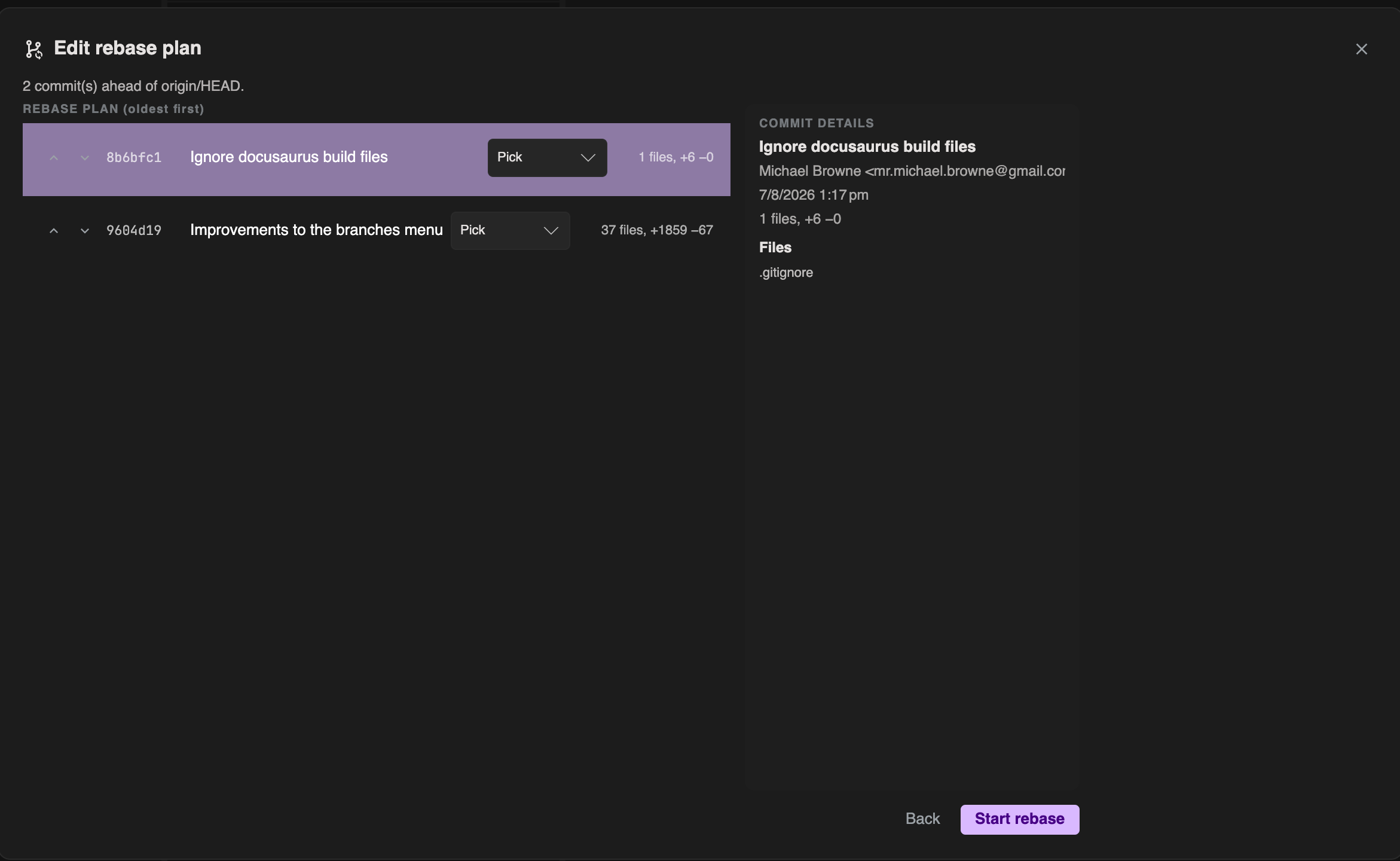
2. Edit the plan
For each commit in the todo list you can set actions such as:
| Action | Meaning |
|---|---|
| Pick | Keep the commit |
| Reword | Keep but edit the message |
| Squash | Combine into the previous commit |
| Fixup | Like squash, typically dropping the message |
| Drop | Remove the commit from the result |
You can reorder commits and edit messages where the plan requires it. A file list helps you see what each commit touches.
3. Running
Progress feedback appears while Git applies the plan.
4. Conflicts
If conflicts occur:
- Resolve them in your usual tools outside GIT DELTA (or continue once the tree is fixed)
- Use Resume to continue the rebase
- Or Abort to return to the pre-rebase state
See Conflicts.
5. Review and finish
- Review before/after as presented by the wizard
- If an upstream exists, you may be offered force push with lease
- Choose Done when finished
Caution
Interactive rebase rewrites history. Avoid rebasing commits that others already based work on, unless your team expects it.